
Genixly team
-
March 12, 2026
GEO for Local Businesses Part 4: The Entity Clarity Strategy for Answer Engines
Lear more

Learn a practical AI implementation roadmap to move from pilot to production in 90 days. Prioritize use cases, measure ROI, and build real workflows.



Let’s get straight to it: this AI implementation roadmap is for people looking to improve the daily routine of their employees, customers, or both. If you are going to implement AI for the sake of the AI trend and have landed on this page somehow, please leave it. But if your goal is efficiency and improvement backed by the latest technologies, you are welcome! Below, you will find the 90-day AI implementation roadmap for CTOs and COOs that explains how to come up with any idea and turn it into a working project.
If you’ve explored the niche already, you might have noticed that most AI implementation roadmaps fade out. Everything starts with a good idea. Then someone builds a prototype and offers a demo that gets people excited. Maybe there is even a place for a small pilot that promises to revolutionize your business. But in fact, nothing really changes in the original workflow, and the team has to go back to doing things the old way.
Do you think it happens because the AI doesn’t work? While it may seem so at first sight, the real reason lies in another domain. A new “revolutionary” product fails because it was never intended to become a part of real work. That’s, however, the problem common to most roadmaps. But AI only starts to work when it’s tied to something concrete — a task, a handoff, a decision — and it runs often enough that people rely on it. So, how to implement it right? You will find the answer below.
The following article discusses a practical AI implementation roadmap focused on getting one real workflow into production in about 90 days. Instead of discussing where to use AI, we focus on something way more valuable, guiding you, as CTO, COO, or another specialist who works at the point where strategy meets execution, along the path to understanding what can actually be put into production so it runs, holds up, and improves a KPI.
If you look closely, most AI projects don’t fail with a big shutdown and a clear “this didn’t work” moment. What happens instead is that they slowly lose momentum.
At first, everything looks promising because the pilot runs and the outputs seem reasonable. People see this ideal picture and imagine how it could perfectly fit into daily work. But then small things begin to surface.
For instance, the system needs manual fixes more often than expected. At the same time, someone has to double-check outputs since the output is never as ideal as it seemed in the prototype. In addition to that, edge cases start piling up. It’s still not enough to cancel the AI project (mostly because of the time and money spent on it), but just enough for you to stop relying on it in every operation it was intended to enhance. And that’s usually the turning point.
Because once a workflow isn’t trusted, it starts being used less often. At a certain moment, the level of frustration is enough to completely abandon the once promising endeavor, no matter how good it actually is.
There’s also another pattern that’s easy to miss. The pilot exists, but it lives outside the actual processes. You still copy data manually and make decisions the old way. The “AI part” becomes something extra rather than something essential; it is attached rather than integrated. The good news is that you can usually spot this early.
First of all, you need to verify whether this workflow runs without someone watching it all the time. Secondly, if it breaks, do you know where and why? And most importantly, you must understand whether AI changes anything in the actual processes. If the answer is “not really,” the pilot isn’t moving toward production. It’s drifting, and that’s the key difference:
If it doesn’t, you either deal with AI implemented for the sake of the trend or somebody failed with the implementation. And the second reason is exactly what we discuss below. If you want to learn more about why AI pilots fail, follow this link: Why AI Pilots Fail: The 5 Patterns That Kill Production Rollouts. Now, let’s proceed with the implementation difficulties that usually cause failure.
Although many failure scenarios exist, a pilot usually stalls for one simple reason: nobody has ever defined what “done” looks like. It’s not in a vague “model works,” “outputs look good,” or “it seems that our team has become more productive.” Leave these generic phrases for daily kitchen discussions between people who have nothing to do with innovation and business processes. What you should do is answer a very practical question: If AI has become part of daily work, can we measure its impact, and is it worth the investment?
That’s where our idea of a Workflow Unit comes in.
Instead of thinking in terms of features or use cases, a Workflow Unit helps to think in terms of one small piece of work that is fully operational. Don’t expect it to be perfect right from the beginning. However, you may expect that it is real and measurable.
A Workflow Unit is considered “done” only when the following four things are in place:
If even one of these components is missing, the Workflow Unit isn’t really in production. It might look close, but it’s still fragile. The lack of this integrity is why many AI projects feel almost finished but never quite get there. While solving the core problem, they never close the loop around it or cause unexpected problems.
A practical example makes this difference very clear. Many companies experimented with AI chatbots for customer support, including early deployments, such as those described in the case of Air Canada. The company’s chatbot gave a passenger incorrect advice about a bereavement discount, suggesting he could apply after booking a full-fare ticket. When he followed those instructions, the airline denied the request, claiming the chatbot was wrong. The tribunal rejected this argument and ruled that Air Canada is responsible for information provided by its systems, ordering the company to pay damages.
Although the chatbot did its job, it was neither governed nor monitored properly, failing as a Workflow Unit. Compare that to how Klarna implemented AI in support operations: instead of replacing the process, they embedded AI into ticket handling workflows with clear boundaries, monitoring, and human oversight. The results were astonishing. The AI assistant has had 2.3 million conversations for 1 month, doing the equivalent work of 700 full-time agents.
The difference between these two cases is subtle but critical. One is a tool that produced answers, the other is a Workflow Unit that has become part of how work actually gets done.
A real AI implementation roadmap, therefore, should not end when something works once. It should end when one Workflow Unit runs reliably, holds up under real conditions, and starts to move a KPI. Everything else builds on top of that.
Once you understand how a Workflow Unit looks and what “done” means in an AI implementation roadmap, the next question becomes unavoidable: Where do I even start?
This is the first breaking point where most roadmaps quietly go off track. Many people expect them to fail at the model stage or during deployment. But the problem occurs long before, at the moment of choosing the first use case.
The very human nature lies at the foundation of this issue. Agree, we can all be both greedy and hasty in our decisions. It’s tempting to pick something flashy, select something easy to demo, or choose multiple features at once. Those choices, however, rarely lead to production. What we say next may sound obvious, but it is extremely important to point it out:
By evaluating, we mean a real, practical evaluation rather than an abstract theorization. A good starting point is to score each potential use case across three dimensions in a simple ROI blueprint:
Putting these three aspects together can help you see a pattern. Next, you need to choose wisely. Note that the best first workflow is rarely the most ambitious one. It’s the one that sits in a very specific zone, meeting the following parameters:
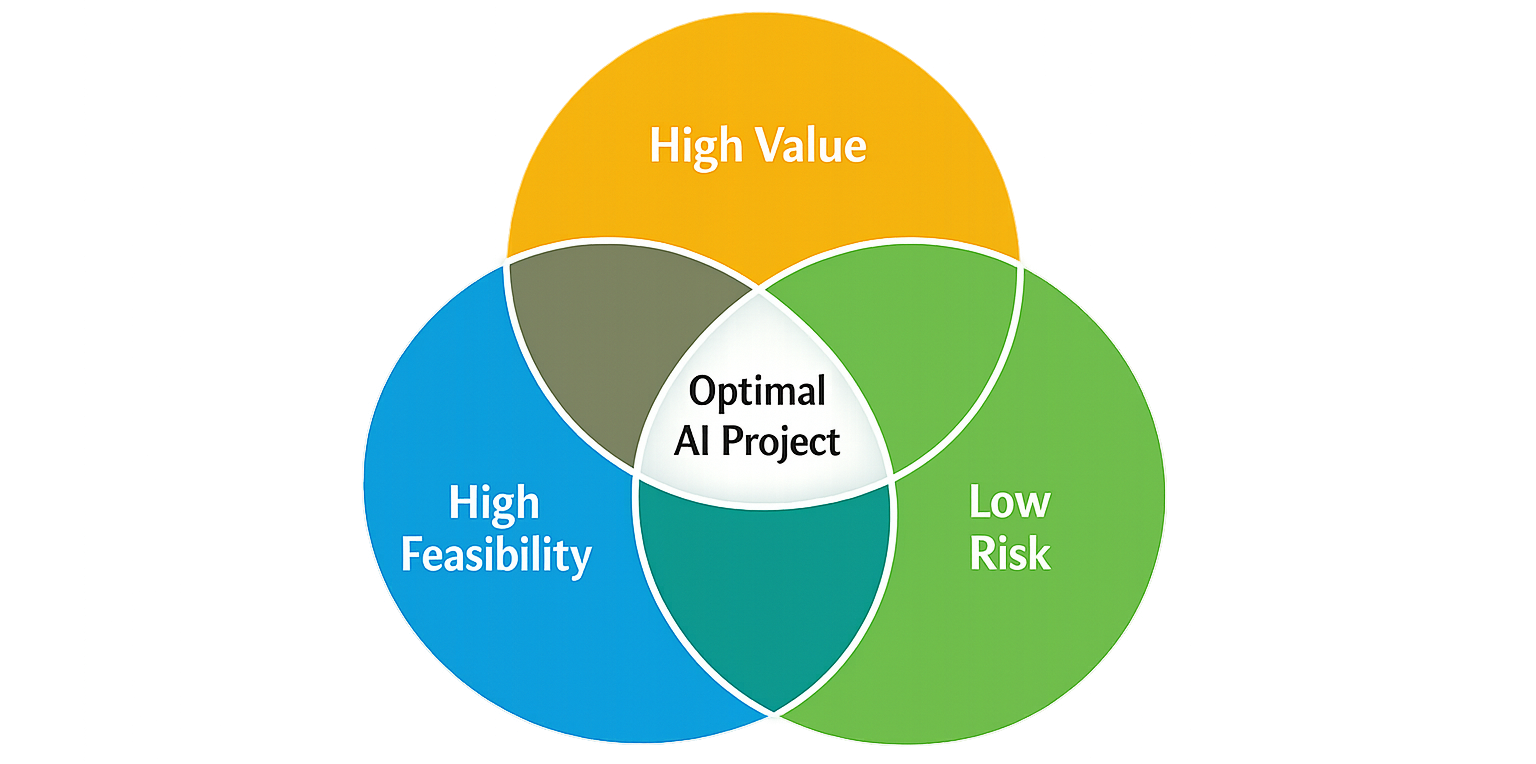
That combination is what gives you a real chance to get something into production within a reasonable timeframe. And just as importantly, it gives you something you can prove. An AI implementation roadmap is efficient only once you can point to a workflow and say that it runs, holds up, and can be measured.
In practice, most AI work falls into these three categories: deterministic automation, document-heavy processes, and agent-like tasks. The huge mistake is trying to start with the most advanced one. Let’s explain each category to justify this statement.
Deterministic automation is usually the best starting point. Tasks in this category follow a clear pattern: data comes in, something happens, and a result is produced. These are a few examples of a deterministic workflow: syncing systems, routing requests, updating records, or triggering actions based on specific conditions.
People learned how to automate such processes long before AI. Although they may look different, the common thing is that there’s very little ambiguity here. That’s exactly why implementing AI works well. You define what should happen, test it, monitor it, and make it reliable without too many surprises. If something breaks, you know where to look. Most stable Workflow Units are deterministic workflows.
Document intelligence comes next. The challenge here is not the process itself, because the process on its own is fairly deterministic. The challenge is associated with the input that may vary a lot. Since invoices, contracts, emails, and PDFs don’t arrive in clean, structured formats, you need to extract meaning, validate it, and turn it into something the system can use.
AI becomes more useful in this type of workflow, but it also introduces more ways for things to go wrong. Document-based processes require validation rules, exception handling, and often some level of human review. Everything is still very manageable, just less predictable than with deterministic workflows.
Agent-like tasks are the most flexible, hence, most fragile. They involve decisions, multiple steps, and interactions across tools. For example, preparing a proposal, handling a support case, or coordinating several actions based on context are way more complex than inventory sync between two stores every time a purchase is made.
Agent-like tasks look powerful, but introduce more uncertainty. You need to set clear boundaries, approvals, and monitoring. Otherwise, they can easily behave in unexpected ways. And that’s why agent-like tasks are rarely the best place to start.
So, you can include a deterministic workflow that meets the requirements of the simple ROI blueprint into your AI implementation roadmap. But it should be only one workflow, and here is why.
Once you’ve scored a few use cases using the simple ROI blueprint, you’ll likely end up with a short list of “good candidates.” This is the point where most teams make their next mistake. Instead of picking one workflow, they pick two, sometimes three, sometimes even more.
It sounds reasonable because everyone wants to move faster in today’s world. The more workflows you choose, the more you can test and implement, spreading the effort. In practice, however, this approach leads to the opposite: your attention gets split, the number of edge cases multiply, nothing actually reaches a production level, etc. This is why it helps to follow a very simple constraint:
That’s the 1-workflow rule, and it is essential because getting even one workflow fully into production is harder than it looks. However, when you focus on a single project, a few significant aspects change:
Firstly, you move beyond surface-level implementation. Instead of stopping when “it works,” you keep going until it’s integrated, monitored, governed, and actually used. By choosing one workflow at a time, you simply get more time to deal with edge cases, failures, approvals, governance, and other things that you may postpone when trying to automate two or more workflows. And it is especially important considering the second significant aspect of the 1-workflow rule:
Secondly, you create a reference point for further AI implementations. Once your first workflow turns into a Workflow Unit, it becomes a template. You understand what it takes, what breaks, and how long it really takes to stabilize something. That way of treating your AI implementation roadmap is far more valuable than having three half-finished pilots.
Third, progress becomes visible much faster. Building one workflow takes less time than trying to push three forward at once, so you reach a real result sooner. It’s also much easier to show one workflow that clearly improves a KPI than to explain several experiments that are still “in progress.”
What’s less obvious is that following the 1-workflow rule in your AI implementation roadmap actually speeds things up overall. Once you’ve implemented one workflow deeply, it becomes a reference point. That experience makes the next workflow much faster to implement. The second implementation helps you calibrate the initial reference point, paving the path for even easier implementation for the next workflow. Without it, you’re running multiple projects in parallel, each with its own unknowns and no shared foundation.
Once you’ve picked the one workflow that actually matters, the next task is pretty straightforward on the surface: you need to get it into production. However, things may get complicated the very moment you start the work. At this point, our AI implementation roadmap offers a practical approach that can help you treat your first AI workflow implementation as a short, focused build rather than an open-ended project. Here’s how that typically unfolds.
At this stage, nothing gets built yet. The better you plan during this period, the faster you can implement the AI next. That’s the main idea behind this stage.
Your primary goal is to understand the existing workflow as it actually is, rather than how it’s documented. Focus on how people really do it: where data comes from, where it breaks, where decisions are made, and where delays happen.
Your secondary goal is to define what “done” means for this workflow, as we described earlier in the “Workflow Unit” section.
Two weeks are pretty much enough to form a clear picture of the workflow and a shared understanding of what you’re trying to change. If done faster, you can proceed to the next stage earlier. However, it is important to slow down and thoroughly explore the aspects of your AI implementation.
Next, you start building the actual AI workflow. This usually means connecting systems, defining triggers, processing inputs, and producing outputs.
What’s most important at this point is the process itself rather than the ideal outcome. You’ll quickly run into edge cases and data inconsistencies, but that’s something you should expect before even starting to work. Remember, there is no need to solve everything right now. Your primary goal is a version that works under controlled conditions and is suitable for the next stage.
Now that you have a kind of working prototype — something that functions but still depends heavily on external conditions — the next AI implementation roadmap step is to make it reliable. The following four weeks should be dedicated to adapting this workflow to real-life conditions.
First, you need to set up monitoring. You should be able to track everything that happens inside the workflow — when it runs, what it does, and where things start to break.
Second, you need a clear approach to handling errors. This starts with notifications. The system should never stay silent when something goes wrong. Instead, it should inform you immediately. Silent failures are what usually lead to bigger problems later. At the same time, you should think about how issues can be resolved automatically. At the very least, the workflow should make it easier for a person to step in and fix the problem. In some cases, it may be possible to handle it without human involvement at all.
Third, you need fallback paths. Not every issue can be fixed directly, so the workflow should know what to do next. It should be able to take alternative steps, inform the right people, and continue running without bringing the entire process to a stop.
Fourth, this is where governance starts to take shape. You need to decide what runs automatically and what requires human approval. Some actions can be executed without supervision, while others should never move forward without a clear sign-off.
At this stage, you build a workflow that is stable enough to run beyond controlled conditions.
The importance of the final stage of every AI implementation roadmap is often underestimated. Although it may feel like the workflow is fully ready and fits perfectly into production, it’s still not a true Workflow Unit. There are two reasons for that.
First, during the previous stages, it’s impossible to predict every scenario. No matter how well you design the workflow, real-life usage will always reveal edge cases you didn’t anticipate.
Second, you can only measure the real impact of the workflow in practice.
This is where the next few weeks come in. You’ll need to collect feedback from the people who actually use the workflow and adjust it based on how it performs in real conditions. In reality, this process often takes longer than expected. Some edge cases may only appear weeks or even months later, and you’ll need to respond to them as they arise.
At the same time, you need to evaluate the effectiveness of the workflow. In a nutshell, you just need to answer these two questions:
There are usually two outcomes.
In the first case, the workflow reduces the workload on the existing team. This can mean fewer repetitive tasks, less manual effort, fewer errors, and more time for higher-value work.
In the second case, the workload remains roughly the same, but the team becomes more scalable. With the same number of people, you can handle more volume, respond faster, and grow without immediately increasing headcount.
Both outcomes are valuable. But you can only see them once the workflow is actually in use. And that’s the point where your AI implementation roadmap finally becomes more than a system that works. It becomes a system that delivers.
Once you’ve done all of that once, the next workflows become much easier to build, but still, there is at least one more obstacle that may slow you down.
Unfortunately, the right workflow and a clear plan do not guarantee a Workflow Unit on their own. What’s also important to make your 90-day AI implementation roadmap complete is clear ownership.
The problem starts when you realize that your AI project sits somewhere in between teams. In the best case, it’s a kind of The Epic Split. But what if there are more than two trucks, and the DSR is not as good as in the meme ad: business expects unrealistic results, the IT team sees the project more realistically, and the security team cannot approve the current state of things? If no one clearly owns their part, apparently, it results in a disaster. Instead of a 90-day run, you get stuck with an endless project, where decisions get delayed, responsibilities blur, and progress slows down.
To avoid this situation, this AI implementation roadmap offers a simple operating model with just three clear roles.
A business owner is the person closest to the actual workflow, because they understand how the work is done today, where it breaks, and what improvement would actually matter. What’s also noteworthy is that it is a person who defines KPIs, specifying what needs to change to be considered successful.
And what’s very important here is that this role is never technical. The business owner has an operational role. So, it means that it is the exact person who defines the problems to be solved, what the output should look like, and when the project is good enough to be used daily.
Take a strong business owner out of the equation, and you risk getting a workflow that is technically correct but practically useless.
An IT owner is here to implement the business owner’s idea into something real. They handle data flows, system connections, errors, edge cases, and overall reliability, making sure the workflow actually runs.
Just as importantly, an IT owner is responsible for what happens after launch. If something breaks, they know exactly where to look and how to fix it.
Without an IT owner, even a well-designed workflow never exits the prototype stage.
The role of a security owner is pretty much straightforward: to define what is allowed and what isn’t. Real problems start if this role is brought in too late. A better approach, however, is to involve security from the start. Their job is to define clear boundaries around what a business owner wants and what an IT owner can implement, ensuring that the workflow doesn’t introduce unnecessary risk, especially when it comes to sensitive data or external communication.
Although it may feel like security specialists slow things down, they make sure what gets built can actually be approved and used in a real environment. Exclude this role from the implementation process, and you may face unwanted consequences in the future when the entire system is compromised due to a small mistake in your AI implementation.
Below, you can see roles mapped to each AI implementation roadmap stage:
Note that these three roles don’t need long meetings or complex coordination. What they need is clarity in understanding what they’re responsible for. Done this way, decisions become faster, trade-offs are easier to make, and the workflow moves forward without constant friction, turning an AI implementation roadmap from a shared idea into something that actually gets built and used.
Now let’s talk about the stage where everything seems to be working, but is it really?
The problem is that an AI implementation can technically work, automating certain steps, while having very little impact on the overall workflow. The easiest way to avoid this trap is to ask a simple question: what actually changed?
If you have a clear answer, you’re already halfway there. If not, we are here to help you.
To understand what has actually changed after you implemented AI, you need to compare the workflow before and after. That means answering a few practical questions:
Let’s take a simple example.
You implement an AI chatbot for an online store. It fully replaces one employee who was earning $1,000 per month. The chatbot costs $100 per month to maintain. That means you’re saving $900 every month. The implementation cost was $1,800, so the system pays for itself in two months and starts generating net savings from the third month. Over time, it creates even more value — for example, when the company expands into Spanish-speaking markets, since the chatbot can already handle multiple languages.
Without this kind of calculation, it’s impossible to understand the real impact of what you’ve built. This is the difference between a “useful AI feature” and a real Workflow Unit — something whose impact can be measured directly in financial terms, not vague statements like “it feels easier.”
So even when your AI implementation looks complete, always compare before and after. That’s how you know it actually works.
Here is an example before/after scorecard for an AI implementation roadmap:
Here is how to use it:
You don’t need all metrics to signal the dramatic enhancement. Even 2–3 strong signals are enough: time saved, cost reduced, output increased, etc. That’s what turns an AI feature into a Workflow Unit with measurable ROI.
Finally, let’s talk about one of the least obvious aspects of an AI implementation roadmap — adoption by your team.
People react to AI very differently. Some are genuinely excited about tools that can remove repetitive tasks and free up time for more meaningful work. Others are concerned — especially when automation touches areas like support, where jobs may be affected. So what should a business owner do in this situation?
First of all, it comes down to open communication. An AI workflow shouldn’t appear out of nowhere and disrupt people’s work. If you’re implementing something that truly makes their daily tasks easier, resistance is usually minimal. You’ll get useful feedback, people will engage with the system, and adoption happens naturally.
But if AI is introduced just because “it’s a trend” or “everyone else is doing it,” the result is often the opposite. Instead of simplifying work, it adds friction. The implementation stays surface-level, and the workflow requires constant supervision and manual corrections. In many such cases, the original process ends up being more efficient than its AI version (never ignore the before/after scorecard!!!).
There’s also a more sensitive aspect to consider. If automation creates a real risk of job reduction, you need to be careful about how you collect feedback. People whose roles are directly affected are not a neutral audience — their perspective is shaped by that risk. This doesn’t mean their concerns should be ignored, but it does mean their feedback needs to be interpreted in context.
In the end, adoption doesn’t depend on how advanced the AI is. It depends on whether people see it as something that helps them or something that gets in their way.
The hardest step is always the last one — getting started. At this point in your AI implementation roadmap, you already know what a Workflow Unit is. You understand how to assign roles. You have a clear three-month plan. You even know how to work with your team in a way that brings real value instead of adding friction. Now, all that’s left is to begin. Here’s a simple 60-minute kickoff you can run next Monday.
Pick one workflow and describe it in plain terms:
If it takes more than a few minutes to explain, it’s probably too big.
Walk through how this work is done today:
This is where most of the useful insights show up.
Agree on what this workflow should look like in production.
Keep it simple, but make it concrete.
Decide who owns what.
No long discussions — just clear responsibility.
End with one action — something that can be started immediately. It should not be a plan for the next month. Just the next step that moves things forward:
A good AI implementation roadmap doesn’t begin with a strategy deck. It begins with a conversation like this: one workflow, one hour, and one clear next step. That’s usually enough to get things moving.
The main reason most AI implementation roadmaps fail is complexity: too much is attempted at once, and nothing actually makes it into daily work. Too many use cases, too many tools, too much abstraction — and in the end, no real change or additional load on a team that has to face the “improved” daily operations.
A better approach is much simpler, and it is illustrated in this 90-day AI implementation roadmap for CTOs and COOs. Pick one workflow and take it seriously enough to make it work end to end. Not as a demo, not as a pilot, but as something that runs, holds up, and improves a KPI in a way you can actually measure.
When you’ve done that once, the picture changes. You understand what it really takes to integrate systems, handle edge cases, define approvals, and build something people trust within the context of your unique business environment. That’s how to stop guessing and start operating, while an AI implementation roadmap stops being a plan and becomes a system.
If you’re at the stage where ideas make sense but nothing has fully landed in production yet, that’s exactly where Genixly can help. We focus on turning one workflow into something real — integrated, governed, and measurable — and then scaling from there.
If you have one workflow that costs your team too much time and too many errors, we can tell you in a single conversation whether it is ready for production — and what it would take to get there. Reach out to Genixly, and let’s look at your first workflow together
Our blog offers valuable information on financial management, industry trends, and how to make the most of our platform.